

Presents


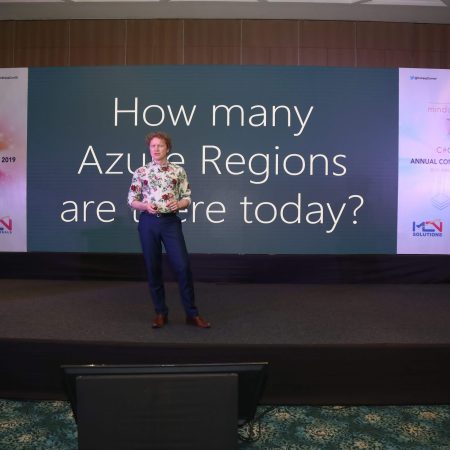
Magnus Mårtensson
Microsoft Regional Director, Azure MVP, CEO Loftysoft

Avirag Jain
Director & CTO R Systems

Mahesh Chand
Founder C# Corner, CEO Mindcracker

Chris Gali
CEO & Co-Founder Graphite

Subinder Khurana
Chief Architect StoryProcess, Founder NASSCOM DeepTech Club

Bryan Rishforth
Investor, Chairman Graphite

Bryn Everson
Director Biz Dev Graphite

Raj Tiwari
Digital Transformation Leader, Futurist and Visionary

Joseph Guadagno
Microsoft MVP, Lead Quicken Loans

Nikita Sachdev
Entrepreneur, Blockchain Enthusiast & Advisor, Social Media Influencer

Doug Wagner
COO & Founder Adapt Technical Group

Ritesh Modi
Architect, Senior Evangelist, Cloud Architect

Crystal Wenrick
Director Communications Mindcracker

Allen O’Neill
Microsoft MVP, Consulting Engineer/Architect

Praveen Kumar
CEO MCN Solutions

Chris Love
Founder Love2Dev, Microsoft MVP, Author

Sanjay Vyas
Microsoft Regional Director, Microsoft MVP, Founder & CEO SkillLabs Technologies

Veena Sarda
Deep Learning Consultant, Author

Sekhar Srinivasan
C# Corner MVP, Microsoft Certified Trainer, Pluralsight Author

Lalit Bansal
Founder & CEO - EIY SYS

Navdeep Garg
CEO Revinfotech

Prakash Tripathi
Tech Manager/Leader, Microsoft MVP, Blogger

Bhavna Jain
Breakthrough Consultant

Naveen Sharma
Enterprise Architect, Leadership Coach, Author

Vidya Vrat Agarwal
Principal Architect, Microsoft MVP, Author

Sheetal Agarwal
Founder Clownselors, Medical Clown, Trainer

Abhishek Kant
Founder GTM Catalyst

Vishnu Saran
Founder & CEO VoiceQube

Sandeep Soni
Founder & CEO Deccansoft, Microsoft Certified Trainer

Parveen Malik
AVP InfoSec & Vulnerability Management, Information Security Expert

Nitin Pandit
Microsoft MVP, Developer Evangelist, Author

Niloshima Srivastava
C# Corner MVP, Tech Architect, Trainer, Blogger

Bala Chirtsabesan
Senior Software Engineer at Microsoft, Author

Manoj Mittal
Sr. Technical Architect, C# Corner MVP, Author

Chandni Di
Co-Founder Voice of Slum

Vithal Wadje
Technical Lead, Microsoft MVP, Author

Shivam Ahuja
Founder SkillCircle, Business Mentor

Chervine Bhiwoo
Solution Architect, Microsoft MVP, Author

Saurabh Jain
Vice President Paytm, Founder Fun2Do Labs, Author

Vinay Solanki
Head IoT at Lenovo, Founder IoT-NCR

Anshu kumari
Founder Blockchainkids, Inventor, Trainer

Amit Singal
CEO Startup Buddy

Dev Pratap
Co-Founder & CEO Voice of Slum

Amey Vartak
Technology Consultant, Full Stack Developer, C# Corner MVP, Author

Viswanatha Swamy
Principal Software Engineer, C# Corner MVP, Author

Sanket Verma
Research Engineer @ Ballistics (Forensics) and Chair, PyData Delhi

Sourabh Somani
Lead Developer, Microsoft MVP, Author

Abhishek Mishra
Software Architect, C# Corner MVP, Author

Siddharth Vaghasia
Technical Consultant, C# Corner MVP, Blogger

Bassam Alugili
Senior Software Specialist, Database Expert

S Ravi Kumar
Solution Architect, C# Corner MVP, Author

Sundaram Subramanian
Full Stack Developer, C# Corner MVP, Speaker

Deepesh Somani
Solution Architect, Microsoft MVP, Author

Debasis Saha
Technical Project Manager, C# Corner MVP, Blogger, Author

Vipul Jain
Software Architect, C# Corner MVP, Author

Akshay Patel
Technical Architect, Microsoft Certified Trainer, C# Corner MVP, Author

Stephen Simon
RPA Developer, Evangelist, Author

Vivek Sharma
Founder Kingster636, AR/VR Specialist

Jeetendra Gund
Technical Lead, C# Corner MVP, Author

Sujal Beniwal
AI Enthusiast, Student

M Viknaraj
Microsoft MVP, Azure Architect, Author

Prasham Sabadra
Software Architect, C# Corner MVP, Trainer, Author

Aakash Maurya
Senior Developer, C# Corner MVP, Speaker

Ankit Sharma
Senior Software Engineer, C# Corner MVP, Author

Mangesh Gaherwar
Team Lead, C# Corner MVP, Author

Viral Jain
Technical Consultant, C# Corner MVP, Author

Bhasker Das
Solution Architect, Evangelist

Manish Dwivedi
Associate Project Manager

Ck Nitin
Programmer, Author

Rohit Gupta
Technical Trainer, Author

Manish Tewatia
Full-stack Marketer, UX Designer

Bhavya Gaur
Technical Illustrator

Rohit Tomar
SEO/SMO Expert
Web Track
Cloud & Data Track
Dev Track
Registration & Breakfast
Future of Desktop Apps with JS (ElectronJs)
Nitin Pandit
Building Serverless Microservices Using Microsoft Azure
Vithal Wadje
Innovating RPA: A Robot for Every Person
Stephen Simon
Managing Cloud Storage Accounts using Logic Apps
Viknaraj Manogararajah
Data visualization using Python
Sekhar Srinivasan
Going Cross platform with AR Foundation
Vivek Sharma
Keynote
Managing your Azure dependencies in ASP.NET Core apps using VS
Bala Chirtsabesan
Securing Applications on Intelligent Azure
Abhishek Mishra
Getting started with Blazor the Framework of Future
S Ravi Kumar
Lunch
Build Progressive Web Apps using Angular 9
Debasis Saha
Build and deploy to any platform using Azure DevOps
Chervine Bhiwoo
Deep Dive in Azure Service Bus
Akshay Patel
Build a Native Mobile Application using React Native and JavaScript
Joseph Guadagno
Making sense of Web Job, Web Job SDK and Functions in Azure
Prakash Tripathi
CloudFront Distribution in AWS
Viral Jain
Tea Break
Introduction to PowerBI
Aakash Maurya
Build Advanced SPFx solutions with React and Graph API
Siddharth Vaghasia
Build Business Intelligence Analyst (BIA) Skills
Sundaram Subramanian
Deep dive of Power Platform – AI BUILDER
Prasham Sabadra
Panel 1
What's new in SharePoint development
Vipul Jain
Build a SSO (Single Sign On) based Native JavaScript application with Microsoft Identity within 10 minutes
Manoj Mittal
Panel 2
Applications and working of AI
Veena Sarda
Deploying serverless API's with .Net core 3.0 on AWS & Azure
Amey Vartak
Panel 3
Blockchain with .NET Core (Ark)
Anshu Kumari
Closing Note & Prize Distribution
Dev Track
Cloud Track
Architecture Track
Emerging Tech Track
Registration & Breakfast
Creating Full-Stack Web Apps Using Server-Side Blazor
Ankit Sharma
Real time face recognition with MS Cognitive Services
Niloshima Srivastava
Building Scalable APIs with GraphQL
Jeetendra Gund
Future of development with AI and Blockchain
Navdeep Garg
Debugging Tips and Tricks with Visual Studio 2019
Joseph Guadagno
Azure Containers
Abhishek Kant
Enterprise Architecture
Naveen Sharma
Bot Framework - learn it fast and look like a boss!
Allen O’Neill
Keynote
.Net Core & C# 8 Performance
David McCarter
Working with Azure kubernetes services
Ritesh Modi
Becoming an Architect
Vidyavrat Agarwal
Why Techies Need to Learn Product Management
Saurabh Jain
Lunch
Build a rules engine in .Net Core
Sanjay Vyas
Building CI and CD Pipeline using Azure DevOps
Sandeep Soni
Entity Framework Core - Tips and Tricks, Performance Optimization, and Tuning
Bassam Alugili
Hacking your way into Data Science
Sanket Verma
Speed up your .Net Core Website
Sourabh Somani
Azure
Magnus Mårtensson
Demystifying Open Distro for Elasticsearch
Suman Debnath
Future of Data
Shivam Ahuja
Tea Break
gRPC with C# and .Net Core
Mangesh Gaherwar
Panel 1
Essentials of Cloud security
Parveen Malik
Power platform and Dynamics 365
Deepesh Somani
Microservices - the gRPC Way
Viswanatha Swamy
Panel 2
Reserved
Reserved
Closing Note & Prize Distribution
Protecting Blazor WebAssembly Applications With IdentityServer4
Blazor WebAssembly brings .NET code into the browser, allowing developers to build rich single-page applications with C# and familiar Microsoft tooling. That convenience does not change a fundamental security rule: anything downloaded to a user’s device must be treated as public. Secrets, connection strings, client credentials and business rules that must remain private cannot be placed in a WASM application.
IdentityServer4 provides an OpenID Connect and OAuth 2.0 foundation for authenticating users and issuing access tokens to protected APIs. A typical solution separates the Blazor client, the identity provider and an ASP.NET Core API. The browser signs in through a secure redirect, receives tokens appropriate for its public-client status, and presents an access token when calling the API.
The Security Boundary In A Blazor WASM Solution
A Blazor WebAssembly project runs inside the browser sandbox. Even when it is published from an ASP.NET Core host, its assemblies, JavaScript files and configuration can be inspected by the user. A client ID is safe to expose because it identifies the application; a client secret is not safe because a browser cannot keep it confidential.
The protected resource is usually an ASP.NET Core Web API. The API validates the bearer access token on every request and decides whether the caller has the required scope, role or policy. The Blazor interface can hide a button for convenience, but that user interface decision is not a security control. Authorisation must be enforced again at the API boundary.
IdentityServer4 acts as the authorisation server and OpenID Connect provider. It authenticates the user, manages consent where required and issues an ID token for sign-in information plus an access token for API access. Those tokens serve different purposes: an ID token describes the authentication event, while an access token grants access to a particular resource.
For an Australian organisation, this separation matters when a customer portal, internal line-of-business system and partner API have different security requirements. A service used by staff in Sydney may need the same enforcement as one used by contractors in Perth, even if both applications appear to share a login screen.
Registering IdentityServer4 For A WASM Client
The WASM application should be registered as a public OpenID Connect client using the authorisation code flow with Proof Key for Code Exchange. PKCE protects the authorisation code if it is intercepted before the browser exchanges it for tokens. The older implicit flow is unsuitable for a modern browser application and should not be the default for a new implementation.
A conceptual IdentityServer4 client configuration can include a client ID, allowed redirect URIs, allowed post-logout redirect URIs, permitted scopes and the code response type. The redirect URI must match exactly, including scheme, host, path and trailing slash. During local development this may be an HTTPS localhost address; production should use the real HTTPS origin and nothing broader than necessary.
The requested scopes should be narrow. The standard openid scope enables OpenID Connect, profile provides selected profile claims, and an API-specific scope such as orders.read expresses the resource permission. Avoid granting a general-purpose scope when the application only needs to read a limited collection of data.
IdentityServer4 also needs an API resource or equivalent scope definition, depending on the version and configuration style. The API’s audience must correspond to the access token it accepts. Keeping the identity server, client and API settings in version-controlled configuration helps prevent accidental differences between a developer workstation, a test environment and production.
Australian deployments often use separate domains for identity, frontend and API services, such as login.example.com.au, portal.example.com.au and api.example.com.au. That arrangement is workable, but it requires carefully configured CORS, redirect URIs, cookie settings and TLS certificates. A redirect that works on a Melbourne developer laptop may fail after the application is deployed behind a reverse proxy in an Australian cloud region.
Configuring The Blazor Authentication Client
The Blazor WebAssembly application typically uses the Microsoft Authentication Library integration supplied for Blazor WebAssembly, or the authentication package appropriate to the .NET version in use. The client configuration points to the IdentityServer4 authority, identifies the public client and requests the required scopes. The authority URL must be HTTPS outside local development.
The authentication state provider tracks whether a user is signed in and exposes claims to Razor components. Components can use an authorised view to display protected content, while routing can require authentication for selected pages. These features improve the experience, but they do not replace API validation. A malicious user can still call an endpoint directly with a tool such as curl or an HTTP client.
When an API call is made, the application obtains an access token for the configured scope and adds it to the request as an HTTP bearer token. A delegated HttpClient or message handler is commonly used so that token attachment is consistent across calls. The token should be sent only to the intended API origin, never to unrelated analytics, image or third-party endpoints.
Token storage deserves careful treatment. Keeping tokens in browser storage increases exposure to cross-site scripting because JavaScript running in the origin may be able to read them. In-memory handling reduces persistence after a refresh but can require another sign-in. The best choice depends on the application architecture, threat model and framework support, with a strong Content Security Policy and disciplined dependency management required in every case.
For users on the NBN in regional New South Wales or on a mobile connection in remote Queensland, a redirect-based login may be noticeably slower than it is in a Sydney office. The application should show a clear loading state, handle cancellation and avoid repeatedly starting authentication when a request fails. Poor connectivity should produce a useful sign-in error rather than a loop between the client and identity server.
Validating Tokens In The ASP.NET Core API
The API should use ASP.NET Core authentication configured with the IdentityServer4 authority and bearer scheme. The resource server downloads the provider’s discovery document and signing keys, then validates the token signature, issuer, audience, expiry and relevant claims. Signature validation confirms that the token was issued by the trusted authority; it does not by itself prove that the token is intended for this API.
An endpoint protected with an authorisation attribute should reject unauthenticated requests with HTTP 401. An authenticated user who lacks the required scope or policy should receive HTTP 403. This distinction helps client developers diagnose expired credentials versus insufficient permissions and provides more useful audit information.
Scope-based policies are a practical way to protect operations. A read endpoint might require orders.read, while a write endpoint requires orders.write. Roles can represent broader responsibilities, but scopes should describe what a client is allowed to access. Claims should be mapped deliberately because different middleware versions may use different claim type names for roles, names and scopes.
The API should validate issuer and audience rather than accepting any token signed by a trusted key. It should also use a sensible clock skew, enforce HTTPS metadata in production and avoid logging complete access tokens. Logs may include a correlation ID, client identifier and subject identifier where appropriate, but tokens and sensitive personal information should be redacted.
An Australian business handling personal information should align its implementation with the Privacy Act 1988, the Notifiable Data Breaches scheme and its own retention policy. Those obligations do not turn IdentityServer4 into a compliance solution, but they do make careful logging, breach detection and access reviews essential. Hosting the identity service and API in an Australian region can support organisational data-residency requirements, though residency alone does not guarantee compliance.
Protecting Refresh Tokens And Operational Secrets
Access tokens should be short-lived because a browser is a comparatively exposed environment. Refresh tokens can improve the experience when a session lasts longer, but they increase the impact of token theft. If refresh tokens are enabled for a public client, use the provider’s rotation and reuse-detection features where available, restrict their lifetime and understand how the chosen Blazor library stores them.
IdentityServer4 configuration must distinguish between public browser settings and server-side secrets. Client IDs, authority URLs and API scopes can appear in the WASM bundle. Signing keys, database passwords, certificate private keys and confidential client secrets must remain on the server and should be supplied through a protected secret manager or deployment environment.
Cross-origin settings should be exact rather than permissive. The API should allow requests only from known frontend origins, and the identity provider should allow only approved redirect and logout URLs. CORS does not protect the API from direct calls, so it must be treated as a browser convenience rather than an authorisation mechanism.
Cookie settings matter for the identity server’s own login session. Secure and appropriate SameSite settings reduce session leakage, while anti-forgery protections should be enabled for state-changing operations. The site should send security headers such as a Content Security Policy, frame restrictions, a strict referrer policy and HSTS where the deployment is ready for permanent HTTPS.
The Essential Eight guidance from the Australian Cyber Security Centre provides a useful operational reference for patching, restricting administrative privileges, application control, backups and monitoring. IdentityServer4 itself was widely used around the 2020 conference period, but teams maintaining an existing deployment should review its support status, dependencies and migration options before putting a new public-facing service into production.
Testing The Complete Sign-In Journey
Security testing should begin with the normal authorisation-code flow: an unauthenticated user is redirected to IdentityServer4, signs in, returns to the registered callback and receives access to the intended page. Test a cancelled login, an invalid redirect, an expired session and a user who grants no optional permission. Each failure should leave the application in a predictable state.
The API tests should call endpoints with no token, an expired token, a token signed by another authority, the wrong audience and insufficient scopes. They should confirm that protected data is never returned merely because the caller knows an endpoint URL. Test users should represent ordinary staff, administrators and external customers, with permissions checked at both collection and individual-record levels.
Deployment testing must include reverse proxies, HTTPS termination and multiple hostnames. Confirm that the issuer visible to the browser matches the issuer in the token, that discovery metadata is reachable, and that the API can retrieve signing keys after a key rollover. A configuration that works on a local machine may break in a container platform or behind an Australian managed hosting provider.
Finally, review the user experience on the devices people actually use. A government contractor working from Canberra, a retailer on a regional Victorian connection and a developer in a Brisbane office may encounter different latency, browser policies and network filtering. Clear errors, short-lived tokens, robust retry handling and monitored authentication failures make the security design practical as well as technically correct.
















1, CBD, Maharaj Surajmal Road, Near Yamuna Sports Complex, Delhi, 110032





GENERAL QUERIES
Manish Tewatia
manish@csharpcon.com
+91-9718-431-042
TICKET QUERIES
Atul Gupta
conference@csharpcon.com
+91-9910-125-804