

Presents


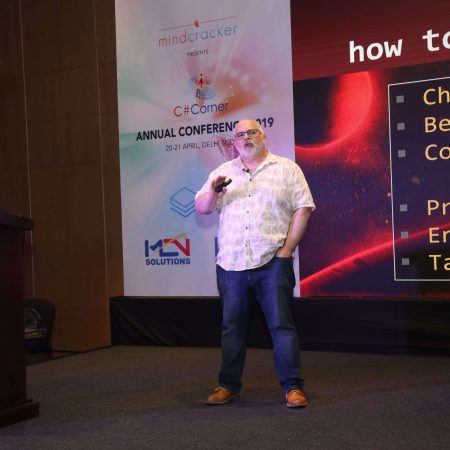
Magnus Mårtensson
Microsoft Regional Director, Azure MVP, CEO Loftysoft

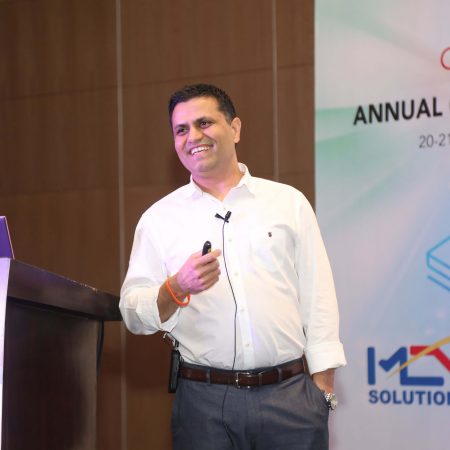
Avirag Jain
Director & CTO R Systems

Mahesh Chand
Founder C# Corner, CEO Mindcracker

Chris Gali
CEO & Co-Founder Graphite

Subinder Khurana
Chief Architect StoryProcess, Founder NASSCOM DeepTech Club

Bryan Rishforth
Investor, Chairman Graphite

Bryn Everson
Director Biz Dev Graphite

Raj Tiwari
Digital Transformation Leader, Futurist and Visionary

Joseph Guadagno
Microsoft MVP, Lead Quicken Loans

Nikita Sachdev
Entrepreneur, Blockchain Enthusiast & Advisor, Social Media Influencer

Doug Wagner
COO & Founder Adapt Technical Group

Ritesh Modi
Architect, Senior Evangelist, Cloud Architect

Crystal Wenrick
Director Communications Mindcracker

Allen O’Neill
Microsoft MVP, Consulting Engineer/Architect

Praveen Kumar
CEO MCN Solutions

Chris Love
Founder Love2Dev, Microsoft MVP, Author

Sanjay Vyas
Microsoft Regional Director, Microsoft MVP, Founder & CEO SkillLabs Technologies

Veena Sarda
Deep Learning Consultant, Author

Sekhar Srinivasan
C# Corner MVP, Microsoft Certified Trainer, Pluralsight Author

Lalit Bansal
Founder & CEO - EIY SYS

Navdeep Garg
CEO Revinfotech

Prakash Tripathi
Tech Manager/Leader, Microsoft MVP, Blogger

Bhavna Jain
Breakthrough Consultant

Naveen Sharma
Enterprise Architect, Leadership Coach, Author

Vidya Vrat Agarwal
Principal Architect, Microsoft MVP, Author

Sheetal Agarwal
Founder Clownselors, Medical Clown, Trainer

Abhishek Kant
Founder GTM Catalyst

Vishnu Saran
Founder & CEO VoiceQube

Sandeep Soni
Founder & CEO Deccansoft, Microsoft Certified Trainer

Parveen Malik
AVP InfoSec & Vulnerability Management, Information Security Expert

Nitin Pandit
Microsoft MVP, Developer Evangelist, Author

Niloshima Srivastava
C# Corner MVP, Tech Architect, Trainer, Blogger

Bala Chirtsabesan
Senior Software Engineer at Microsoft, Author

Manoj Mittal
Sr. Technical Architect, C# Corner MVP, Author

Chandni Di
Co-Founder Voice of Slum

Vithal Wadje
Technical Lead, Microsoft MVP, Author

Shivam Ahuja
Founder SkillCircle, Business Mentor

Chervine Bhiwoo
Solution Architect, Microsoft MVP, Author

Saurabh Jain
Vice President Paytm, Founder Fun2Do Labs, Author

Vinay Solanki
Head IoT at Lenovo, Founder IoT-NCR

Anshu kumari
Founder Blockchainkids, Inventor, Trainer

Amit Singal
CEO Startup Buddy

Dev Pratap
Co-Founder & CEO Voice of Slum

Amey Vartak
Technology Consultant, Full Stack Developer, C# Corner MVP, Author

Viswanatha Swamy
Principal Software Engineer, C# Corner MVP, Author

Sanket Verma
Research Engineer @ Ballistics (Forensics) and Chair, PyData Delhi

Sourabh Somani
Lead Developer, Microsoft MVP, Author

Abhishek Mishra
Software Architect, C# Corner MVP, Author

Siddharth Vaghasia
Technical Consultant, C# Corner MVP, Blogger

Bassam Alugili
Senior Software Specialist, Database Expert

S Ravi Kumar
Solution Architect, C# Corner MVP, Author

Sundaram Subramanian
Full Stack Developer, C# Corner MVP, Speaker

Deepesh Somani
Solution Architect, Microsoft MVP, Author

Debasis Saha
Technical Project Manager, C# Corner MVP, Blogger, Author

Vipul Jain
Software Architect, C# Corner MVP, Author

Akshay Patel
Technical Architect, Microsoft Certified Trainer, C# Corner MVP, Author

Stephen Simon
RPA Developer, Evangelist, Author

Vivek Sharma
Founder Kingster636, AR/VR Specialist

Jeetendra Gund
Technical Lead, C# Corner MVP, Author

Sujal Beniwal
AI Enthusiast, Student

M Viknaraj
Microsoft MVP, Azure Architect, Author

Prasham Sabadra
Software Architect, C# Corner MVP, Trainer, Author

Aakash Maurya
Senior Developer, C# Corner MVP, Speaker

Ankit Sharma
Senior Software Engineer, C# Corner MVP, Author

Mangesh Gaherwar
Team Lead, C# Corner MVP, Author

Viral Jain
Technical Consultant, C# Corner MVP, Author

Bhasker Das
Solution Architect, Evangelist

Manish Dwivedi
Associate Project Manager

Ck Nitin
Programmer, Author

Rohit Gupta
Technical Trainer, Author

Manish Tewatia
Full-stack Marketer, UX Designer

Bhavya Gaur
Technical Illustrator

Rohit Tomar
SEO/SMO Expert
Web Track
Cloud & Data Track
Dev Track
Registration & Breakfast
Future of Desktop Apps with JS (ElectronJs)
Nitin Pandit
Building Serverless Microservices Using Microsoft Azure
Vithal Wadje
Innovating RPA: A Robot for Every Person
Stephen Simon
Managing Cloud Storage Accounts using Logic Apps
Viknaraj Manogararajah
Data visualization using Python
Sekhar Srinivasan
Going Cross platform with AR Foundation
Vivek Sharma
Keynote
Managing your Azure dependencies in ASP.NET Core apps using VS
Bala Chirtsabesan
Securing Applications on Intelligent Azure
Abhishek Mishra
Getting started with Blazor the Framework of Future
S Ravi Kumar
Lunch
Build Progressive Web Apps using Angular 9
Debasis Saha
Build and deploy to any platform using Azure DevOps
Chervine Bhiwoo
Deep Dive in Azure Service Bus
Akshay Patel
Build a Native Mobile Application using React Native and JavaScript
Joseph Guadagno
Making sense of Web Job, Web Job SDK and Functions in Azure
Prakash Tripathi
CloudFront Distribution in AWS
Viral Jain
Tea Break
Introduction to PowerBI
Aakash Maurya
Build Advanced SPFx solutions with React and Graph API
Siddharth Vaghasia
Build Business Intelligence Analyst (BIA) Skills
Sundaram Subramanian
Deep dive of Power Platform – AI BUILDER
Prasham Sabadra
Panel 1
What's new in SharePoint development
Vipul Jain
Build a SSO (Single Sign On) based Native JavaScript application with Microsoft Identity within 10 minutes
Manoj Mittal
Panel 2
Applications and working of AI
Veena Sarda
Deploying serverless API's with .Net core 3.0 on AWS & Azure
Amey Vartak
Panel 3
Blockchain with .NET Core (Ark)
Anshu Kumari
Closing Note & Prize Distribution
Dev Track
Cloud Track
Architecture Track
Emerging Tech Track
Registration & Breakfast
Creating Full-Stack Web Apps Using Server-Side Blazor
Ankit Sharma
Real time face recognition with MS Cognitive Services
Niloshima Srivastava
Building Scalable APIs with GraphQL
Jeetendra Gund
Future of development with AI and Blockchain
Navdeep Garg
Debugging Tips and Tricks with Visual Studio 2019
Joseph Guadagno
Azure Containers
Abhishek Kant
Enterprise Architecture
Naveen Sharma
Bot Framework - learn it fast and look like a boss!
Allen O’Neill
Keynote
.Net Core & C# 8 Performance
David McCarter
Working with Azure kubernetes services
Ritesh Modi
Becoming an Architect
Vidyavrat Agarwal
Why Techies Need to Learn Product Management
Saurabh Jain
Lunch
Build a rules engine in .Net Core
Sanjay Vyas
Building CI and CD Pipeline using Azure DevOps
Sandeep Soni
Entity Framework Core - Tips and Tricks, Performance Optimization, and Tuning
Bassam Alugili
Hacking your way into Data Science
Sanket Verma
Speed up your .Net Core Website
Sourabh Somani
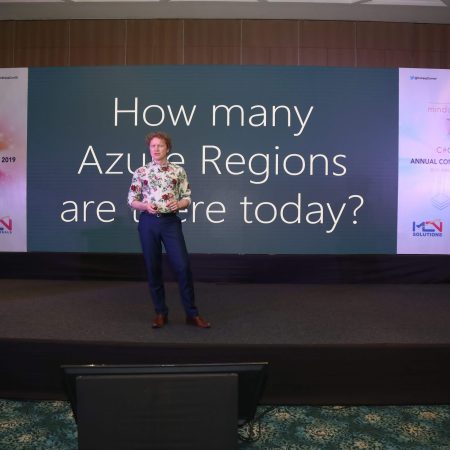
Azure
Magnus Mårtensson
Demystifying Open Distro for Elasticsearch
Suman Debnath
Future of Data
Shivam Ahuja
Tea Break
gRPC with C# and .Net Core
Mangesh Gaherwar
Panel 1
Essentials of Cloud security
Parveen Malik
Power platform and Dynamics 365
Deepesh Somani
Microservices - the gRPC Way
Viswanatha Swamy
Panel 2
Reserved
Reserved
Closing Note & Prize Distribution
Building a Serverless Function in Azure with C# and HTTP Triggers
Building a serverless function in Azure with C# and HTTP triggers is a practical way to expose a small, focused piece of application logic without managing a web server. Azure Functions provides the hosting environment, scaling model, authentication options and monitoring tools, while your code concentrates on receiving a request and returning a useful response.
An HTTP-triggered function can handle a browser request, receive JSON from a mobile application, provide a lightweight API endpoint or connect an internal business workflow. For Australian development teams, this may mean creating a service for a Sydney retail platform, a Melbourne financial application or a Brisbane logistics system without provisioning a complete virtual machine.
The example below uses C# and the Azure Functions isolated worker model. This model keeps the function process separate from the Azure host and provides a modern dependency injection and middleware experience. The same core ideas apply when working through Visual Studio, Visual Studio Code or the Azure portal.
A serverless design still requires careful decisions. Region selection, timeout limits, authentication, dependency management and observability affect the result in production. Teams working with Australian customers may also need to consider data residency, the Australian Privacy Act, customer expectations around local support and traffic patterns across Australian Eastern and Western time zones.
How an HTTP-triggered function works
An Azure Function is a small unit of code activated by an event. With an HTTP trigger, the event is an incoming HTTP request. The runtime matches the request to a route, creates the function execution context and passes values such as headers, query strings and request content to the C# method.
The function can respond with a status code and body. A successful request may return 200 OK, while a newly created resource commonly uses 201 Created. Invalid input should receive 400 Bad Request, and an unauthorised call should normally return 401 or 403. Clear status codes make the endpoint easier to consume from JavaScript, .NET, mobile and integration clients.
Azure Functions offers several hosting plans. The Consumption plan can scale based on demand and charges according to execution and resource usage, which suits intermittent workloads. Premium and Dedicated options provide more predictable performance, longer-running capabilities and additional networking controls. A company operating in Perth or Adelaide may select an Australian Azure region to reduce latency and help meet customer data requirements.
Creating the project with C#
The Azure Functions Core Tools make it possible to create and run a function locally. After installing the tools and the required .NET SDK, create an isolated worker project with a command similar to this:
func init CustomerApi --worker-runtime dotnet-isolated
cd CustomerApi
func new --name GetCustomer --template "HTTP trigger"
The generated project typically contains a program entry point, a function class and configuration files. In an isolated worker application, the Program.cs file configures the host. This is where developers can add dependency injection, application settings, logging providers and other services required by the function.
A simple function can read a query parameter and return a response:
public class GetCustomer
{
    private readonly ILogger<GetCustomer> _logger;

    public GetCustomer(ILogger<GetCustomer> logger)
    {
        _logger = logger;
    }

    [Function("GetCustomer")]
    public HttpResponseData Run(
        [HttpTrigger(AuthorizationLevel.Function, "get", "post",
            Route = "customers/{id?}")] HttpRequestData request,
        string? id)
    {
        _logger.LogInformation("Looking up customer {CustomerId}", id);

        var response = request.CreateResponse(HttpStatusCode.OK);
        response.Headers.Add("Content-Type", "application/json");
        response.WriteString($"""{{"id":"{id ?? "all"}","status":"active"}}""");

        return response;
    }
}
The optional route value allows requests such as /api/customers/42, while the endpoint can also respond when no identifier is supplied. In a real service, replace the interpolated response with a serialised model and retrieve data through an injected repository or client.
Choosing the right function model
Microsoft has supported multiple .NET approaches for Azure Functions, and the best choice depends on the runtime version, library compatibility and application requirements. The isolated worker model is generally a strong option for new C# services because it gives the application its own process and supports familiar .NET hosting patterns.
| Approach | Process model | Strengths | Considerations |
|---|---|---|---|
| In-process .NET | Runs inside the Functions host | Mature programming model and compact setup | Tighter coupling to the host and runtime |
| .NET isolated worker | Runs in a separate application process | Dependency injection, middleware and clearer process boundaries | Requires isolated worker packages and configuration |
| Durable Functions | Orchestrates multiple function executions | Stateful workflows, retries and fan-out patterns | More concepts to manage than a simple HTTP endpoint |
| ASP.NET Core integration | Uses ASP.NET Core routing and features | Familiar controllers, minimal APIs and web middleware | May be unnecessary for a small single-purpose function |
HTTP triggers are well suited to short, stateless operations. They can validate a request, call a storage service, publish a message or return a calculated result. They are less suitable for heavy image processing, lengthy synchronous jobs or operations that need to keep an HTTP connection open for an extended period. In those cases, return quickly and place the work on a queue or use Durable Functions.
Australian teams should also consider the location of connected resources. Hosting a function in Australia East while its database sits in Southeast Asia can create avoidable latency and complicate governance. Azure regions near Sydney and Melbourne are common choices for eastern states, while an organisation with customers in Western Australia may assess the effect of cross-country network distance and choose services accordingly.
Securing and configuring the endpoint
The AuthorizationLevel.Function setting requires a function key for requests made through the standard Azure Functions endpoint. This is more appropriate than anonymous access for an internal utility, although it should not be treated as a complete identity system. For customer-facing applications, use Microsoft Entra ID, API Management or another validated token mechanism where appropriate.
Configuration should be stored outside the code. Local development values belong in local.settings.json, which must not be committed to source control. In Azure, application settings, Key Vault references and managed identities provide safer ways to access connection strings, storage accounts and third-party APIs.
A production function should validate both route values and request bodies. Reject malformed JSON, impose sensible payload limits and avoid returning sensitive exception details. Use structured logging rather than writing secrets or full personal records to logs. This matters for Australian organisations handling health, financial or government-related information, where access control and auditability are central operational concerns.
The trigger can accept several HTTP methods, but exposing only the methods that the endpoint needs reduces ambiguity. CORS settings may be required when a browser application hosted on a different domain calls the function. For public APIs, rate limiting, a gateway and consistent error formats provide additional protection and make client behaviour more predictable.
Testing, deployment and observability
Run the function locally with func start. The Core Tools output displays the local route, commonly using a URL such as http://localhost:7071/api/GetCustomer. Requests can be sent through a browser for a simple GET, or with a command-line tool:
curl "http://localhost:7071/api/customers/42"
Automated tests should cover valid routes, missing identifiers, invalid request bodies, authentication failures and downstream service errors. Keep business logic in ordinary C# classes so it can be tested without starting the Functions host. The trigger method should primarily translate HTTP input into an application call and map the result back to an HTTP response.
Deployment can use Visual Studio, GitHub Actions, Azure DevOps or a ZIP package. A common pipeline builds the project, runs tests, publishes the isolated worker output and deploys it to a Function App. Use separate resources and settings for development, testing and production. Scheduling releases around Australian Eastern Time can make support easier, particularly for teams split between Sydney, Melbourne and Brisbane.
Application Insights supplies request metrics, dependency timings, traces and failure information. Add a correlation identifier when a request crosses several services, and track meaningful measures such as response duration, rejected requests and downstream timeouts. A useful dashboard helps distinguish a code defect from a temporary problem in a database, queue or external provider.
Connecting the function to a real application
A useful HTTP endpoint usually sits at the edge of a wider design. For example, a function may accept an order request, validate it, save a record to Azure Cosmos DB or Azure SQL, and publish an event to Azure Service Bus. The HTTP response should be returned as soon as the accepted work has been safely recorded rather than waiting for every downstream operation to finish.
When processing can be repeated, design for idempotency. A client may retry after a network interruption even though the first request succeeded. An idempotency key, unique business identifier or conditional database operation can prevent duplicate orders and payments. This is especially important for systems supporting Australian retail campaigns around Boxing Day, end-of-financial-year sales or other periods of sharp demand.
Performance should be measured rather than assumed. A function may experience a cold start after a period without traffic, while a dependency such as a database can become the real bottleneck under load. Reuse clients through dependency injection, avoid creating a new connection for every invocation and keep response payloads focused. Select a hosting plan that matches the required concurrency, networking and availability characteristics.
A well-designed C# HTTP function is small, observable and explicit about its contract. Azure handles much of the infrastructure, but developers remain responsible for secure configuration, sound API behaviour and appropriate data placement. With those foundations in place, serverless endpoints can provide a maintainable path from a local prototype to a reliable cloud service for users across Australia and beyond.











1, CBD, Maharaj Surajmal Road, Near Yamuna Sports Complex, Delhi, 110032




GENERAL QUERIES
Manish Tewatia
manish@csharpcon.com
+91-9718-431-042
TICKET QUERIES
Atul Gupta
conference@csharpcon.com
+91-9910-125-804