

Presents


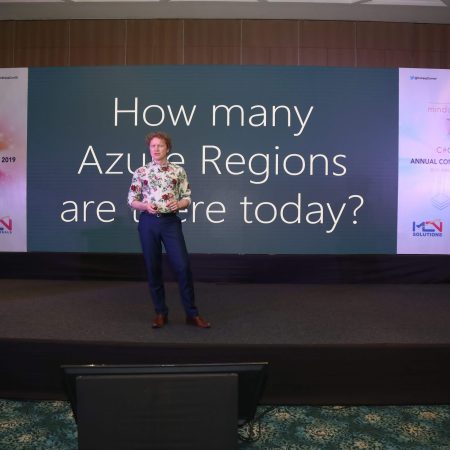
Magnus Mårtensson
Microsoft Regional Director, Azure MVP, CEO Loftysoft

Avirag Jain
Director & CTO R Systems

Mahesh Chand
Founder C# Corner, CEO Mindcracker

Chris Gali
CEO & Co-Founder Graphite

Subinder Khurana
Chief Architect StoryProcess, Founder NASSCOM DeepTech Club

Bryan Rishforth
Investor, Chairman Graphite

Bryn Everson
Director Biz Dev Graphite

Raj Tiwari
Digital Transformation Leader, Futurist and Visionary

Joseph Guadagno
Microsoft MVP, Lead Quicken Loans

Nikita Sachdev
Entrepreneur, Blockchain Enthusiast & Advisor, Social Media Influencer

Doug Wagner
COO & Founder Adapt Technical Group

Ritesh Modi
Architect, Senior Evangelist, Cloud Architect

Crystal Wenrick
Director Communications Mindcracker

Allen O’Neill
Microsoft MVP, Consulting Engineer/Architect

Praveen Kumar
CEO MCN Solutions

Chris Love
Founder Love2Dev, Microsoft MVP, Author

Sanjay Vyas
Microsoft Regional Director, Microsoft MVP, Founder & CEO SkillLabs Technologies

Veena Sarda
Deep Learning Consultant, Author

Sekhar Srinivasan
C# Corner MVP, Microsoft Certified Trainer, Pluralsight Author

Lalit Bansal
Founder & CEO - EIY SYS

Navdeep Garg
CEO Revinfotech

Prakash Tripathi
Tech Manager/Leader, Microsoft MVP, Blogger

Bhavna Jain
Breakthrough Consultant

Naveen Sharma
Enterprise Architect, Leadership Coach, Author

Vidya Vrat Agarwal
Principal Architect, Microsoft MVP, Author

Sheetal Agarwal
Founder Clownselors, Medical Clown, Trainer

Abhishek Kant
Founder GTM Catalyst

Vishnu Saran
Founder & CEO VoiceQube

Sandeep Soni
Founder & CEO Deccansoft, Microsoft Certified Trainer

Parveen Malik
AVP InfoSec & Vulnerability Management, Information Security Expert

Nitin Pandit
Microsoft MVP, Developer Evangelist, Author

Niloshima Srivastava
C# Corner MVP, Tech Architect, Trainer, Blogger

Bala Chirtsabesan
Senior Software Engineer at Microsoft, Author

Manoj Mittal
Sr. Technical Architect, C# Corner MVP, Author

Chandni Di
Co-Founder Voice of Slum

Vithal Wadje
Technical Lead, Microsoft MVP, Author

Shivam Ahuja
Founder SkillCircle, Business Mentor

Chervine Bhiwoo
Solution Architect, Microsoft MVP, Author

Saurabh Jain
Vice President Paytm, Founder Fun2Do Labs, Author

Vinay Solanki
Head IoT at Lenovo, Founder IoT-NCR

Anshu kumari
Founder Blockchainkids, Inventor, Trainer

Amit Singal
CEO Startup Buddy

Dev Pratap
Co-Founder & CEO Voice of Slum

Amey Vartak
Technology Consultant, Full Stack Developer, C# Corner MVP, Author

Viswanatha Swamy
Principal Software Engineer, C# Corner MVP, Author

Sanket Verma
Research Engineer @ Ballistics (Forensics) and Chair, PyData Delhi

Sourabh Somani
Lead Developer, Microsoft MVP, Author

Abhishek Mishra
Software Architect, C# Corner MVP, Author

Siddharth Vaghasia
Technical Consultant, C# Corner MVP, Blogger

Bassam Alugili
Senior Software Specialist, Database Expert

S Ravi Kumar
Solution Architect, C# Corner MVP, Author

Sundaram Subramanian
Full Stack Developer, C# Corner MVP, Speaker

Deepesh Somani
Solution Architect, Microsoft MVP, Author

Debasis Saha
Technical Project Manager, C# Corner MVP, Blogger, Author

Vipul Jain
Software Architect, C# Corner MVP, Author

Akshay Patel
Technical Architect, Microsoft Certified Trainer, C# Corner MVP, Author

Stephen Simon
RPA Developer, Evangelist, Author

Vivek Sharma
Founder Kingster636, AR/VR Specialist

Jeetendra Gund
Technical Lead, C# Corner MVP, Author

Sujal Beniwal
AI Enthusiast, Student

M Viknaraj
Microsoft MVP, Azure Architect, Author

Prasham Sabadra
Software Architect, C# Corner MVP, Trainer, Author

Aakash Maurya
Senior Developer, C# Corner MVP, Speaker

Ankit Sharma
Senior Software Engineer, C# Corner MVP, Author

Mangesh Gaherwar
Team Lead, C# Corner MVP, Author

Viral Jain
Technical Consultant, C# Corner MVP, Author

Bhasker Das
Solution Architect, Evangelist

Manish Dwivedi
Associate Project Manager

Ck Nitin
Programmer, Author

Rohit Gupta
Technical Trainer, Author

Manish Tewatia
Full-stack Marketer, UX Designer

Bhavya Gaur
Technical Illustrator

Rohit Tomar
SEO/SMO Expert
Web Track
Cloud & Data Track
Dev Track
Registration & Breakfast
Future of Desktop Apps with JS (ElectronJs)
Nitin Pandit
Building Serverless Microservices Using Microsoft Azure
Vithal Wadje
Innovating RPA: A Robot for Every Person
Stephen Simon
Managing Cloud Storage Accounts using Logic Apps
Viknaraj Manogararajah
Data visualization using Python
Sekhar Srinivasan
Going Cross platform with AR Foundation
Vivek Sharma
Keynote
Managing your Azure dependencies in ASP.NET Core apps using VS
Bala Chirtsabesan
Securing Applications on Intelligent Azure
Abhishek Mishra
Getting started with Blazor the Framework of Future
S Ravi Kumar
Lunch
Build Progressive Web Apps using Angular 9
Debasis Saha
Build and deploy to any platform using Azure DevOps
Chervine Bhiwoo
Deep Dive in Azure Service Bus
Akshay Patel
Build a Native Mobile Application using React Native and JavaScript
Joseph Guadagno
Making sense of Web Job, Web Job SDK and Functions in Azure
Prakash Tripathi
CloudFront Distribution in AWS
Viral Jain
Tea Break
Introduction to PowerBI
Aakash Maurya
Build Advanced SPFx solutions with React and Graph API
Siddharth Vaghasia
Build Business Intelligence Analyst (BIA) Skills
Sundaram Subramanian
Deep dive of Power Platform – AI BUILDER
Prasham Sabadra
Panel 1
What's new in SharePoint development
Vipul Jain
Build a SSO (Single Sign On) based Native JavaScript application with Microsoft Identity within 10 minutes
Manoj Mittal
Panel 2
Applications and working of AI
Veena Sarda
Deploying serverless API's with .Net core 3.0 on AWS & Azure
Amey Vartak
Panel 3
Blockchain with .NET Core (Ark)
Anshu Kumari
Closing Note & Prize Distribution
Dev Track
Cloud Track
Architecture Track
Emerging Tech Track
Registration & Breakfast
Creating Full-Stack Web Apps Using Server-Side Blazor
Ankit Sharma
Real time face recognition with MS Cognitive Services
Niloshima Srivastava
Building Scalable APIs with GraphQL
Jeetendra Gund
Future of development with AI and Blockchain
Navdeep Garg
Debugging Tips and Tricks with Visual Studio 2019
Joseph Guadagno
Azure Containers
Abhishek Kant
Enterprise Architecture
Naveen Sharma
Bot Framework - learn it fast and look like a boss!
Allen O’Neill
Keynote
.Net Core & C# 8 Performance
David McCarter
Working with Azure kubernetes services
Ritesh Modi
Becoming an Architect
Vidyavrat Agarwal
Why Techies Need to Learn Product Management
Saurabh Jain
Lunch
Build a rules engine in .Net Core
Sanjay Vyas
Building CI and CD Pipeline using Azure DevOps
Sandeep Soni
Entity Framework Core - Tips and Tricks, Performance Optimization, and Tuning
Bassam Alugili
Hacking your way into Data Science
Sanket Verma
Speed up your .Net Core Website
Sourabh Somani
Azure
Magnus Mårtensson
Demystifying Open Distro for Elasticsearch
Suman Debnath
Future of Data
Shivam Ahuja
Tea Break
gRPC with C# and .Net Core
Mangesh Gaherwar
Panel 1
Essentials of Cloud security
Parveen Malik
Power platform and Dynamics 365
Deepesh Somani
Microservices - the gRPC Way
Viswanatha Swamy
Panel 2
Reserved
Reserved
Closing Note & Prize Distribution
Secure .NET connection strings with Azure Key Vault
Across the three days of C# Corner Annual Conference 2020, developers can explore Microsoft Azure, data, web development and DevOps. For .NET builders, a practical security question sits beneath those topics: how does an application obtain the credentials needed to connect to its database without leaving reusable secrets scattered across development machines and deployment pipelines?
Putting a connection string in appsettings.json may appear convenient during a demonstration. That shortcut exposes a reusable credential to source control, workstation images, build logs and deployment variables. Azure Key Vault changes this retrieval model. It gives applications a centrally governed place to store sensitive configuration, while managed identity lets the runtime prove its identity without presenting another password.
Treat connection strings as credentials
A connection string is not merely an address for a database. It can contain a SQL username and password, an access token or a certificate, together with the server name and database name. Anyone who obtains it may connect directly, bypass application-level authentication and operate with whatever permissions the account holds. The credential should therefore have a defined owner, a limited scope, an expiry date and a documented rotation process.
This matters in Australian systems that combine on-premises Windows estates with cloud deployments. Many organisations still maintain .NET applications and SQL Server databases in local data centres while moving new workloads to Microsoft Azure. Deploying a vault in Australia East, covering Sydney, or Australia Southeast, covering Melbourne, provides a clear regional choice, although each service’s availability and data-location terms must still be checked.
End users have become accustomed to strong protection around everyday financial services. Australians commonly check balances, transfer money and authenticate through mobile banking apps using device biometrics or multifactor authentication. A stolen connection string bypasses that front door and reaches the backend directly, so application firewalls and login prompts alone cannot contain the damage.
Build a private Key Vault boundary
Create a separate Azure Key Vault for each environment and lifecycle stage, such as development, testing and production. Store the database connection string as a secret, give it a descriptive name that identifies its purpose, and prohibit credentials from appearing in ordinary application settings. A name such as OrdersDatabase--ConnectionString is easier to audit than Secret1, while the secret itself remains outside source control.
Access should use Azure RBAC rather than broad administrator permissions. Give the application’s managed identity the narrow Key Vault Secrets User role, which permits secret retrieval without allowing vault administration or policy changes. Developers who need operational access can receive a separate role that fits their duties. Audit the role assignments periodically and remove them when a person leaves a project or changes roles.
Network isolation provides another layer. Disable public network access on the production vault, connect it through an Azure Private Endpoint, and configure private DNS so the application resolves the vault address correctly. Private access without the matching DNS configuration can cause application startup failures that look like authentication problems. Use a separate, non-production vault with synthetic credentials for local testing rather than weakening the production network boundary.
Enable soft delete and purge protection so an accidental deletion does not immediately destroy a secret. Send diagnostic logs to a suitable Log Analytics workspace and alert on denied access attempts, role changes and unusual retrieval patterns. Key Vault logs record access metadata rather than secret values, but applications still need strict logging controls because their own exception messages could expose a retrieved connection string.
Resolve secrets safely from .NET
The Azure.Identity and Azure.Security.KeyVault.Secrets packages provide the required .NET integration. Register a SecretClient as a singleton so that its underlying credential token cache can be reused across requests. On Azure, an explicit ManagedIdentityCredential clearly expresses the intended identity. Local development can use DefaultAzureCredential with a signed-in Azure CLI session, while production should not depend on an interactive developer login being available.
using Azure.Identity;
using Azure.Security.KeyVault.Secrets;

var builder = WebApplication.CreateBuilder(args);

var vaultUri = new Uri(
    builder.Configuration["KeyVault:Uri"]
        ?? throw new InvalidOperationException("Key Vault URI is missing."));

builder.Services.AddSingleton(_ => new SecretClient(
    vaultUri,
    new ManagedIdentityCredential()));
Inject that client into the component responsible for database access and retrieve only the named secret it needs. The connection string should enter the data-access layer through a focused provider rather than circulate as a general configuration object.
KeyVaultSecret secret = await secretClient.GetSecretAsync(
    "OrdersDatabase--ConnectionString",
    cancellationToken: cancellationToken);

string connectionString = secret.Value;
Do not log secret.Value, include it in an exception message or attach it to application telemetry. Avoid returning it from a debugging endpoint or exposing it through a configuration API. If the database supports Microsoft Entra authentication and Azure SQL token-based connectivity, that can remove the password from the connection string entirely; Key Vault can then hold the remaining configuration or certificate material.
Secret rotation requires deliberate coordination. Updating a value in Key Vault does not change the password stored in SQL Server. A safe process creates overlapping credentials, updates the application, verifies the new path, and then disables the old credential. During a planned rollout, retrieving a specific secret version can prevent different application instances from silently using different values.
Name-based lookup returns the current version, which can create inconsistent behaviour when several instances cache different values. Use a bounded cache with controlled refresh, or retrieve a pinned version during deployment. A Key Vault outage also needs a defined response: new connections should fail safely, and any temporary cached credential should have a short lifetime rather than becoming a permanent fallback. Never solve an availability problem by restoring a hard-coded production secret to application settings.
Protect the surrounding deployment
The deployment choices described in Kestrel reverse proxy hosting complement this design. A reverse proxy can terminate public TLS and route traffic to several ASP.NET Core applications, but it does not remove the need for authenticated secret retrieval inside each application. Configure trusted forwarding headers carefully, and ensure that proxy logs, health checks and diagnostic endpoints do not expose configuration values.
Australian regulatory and assurance frameworks give credential management additional context. For organisations covered by the Privacy Act 1988, the Australian Privacy Principles include security and access-control obligations, particularly where connection strings provide access to personal information. The Australian Signals Directorate’s Essential Eight is mandatory across Commonwealth entities and widely adopted elsewhere, while APRA’s CPS 234 applies to regulated financial institutions and many Australian banks and insurers. Key Vault supports these controls without automatically satisfying any framework by itself.
Operational readiness matters as much as the initial configuration. Teams in Sydney, Melbourne and other Australian cities need a documented process for revoking a compromised identity, rotating a database password and restoring access during an incident. A tightly restricted break-glass procedure can provide an emergency route, provided every use is logged and reviewed. Monitoring should also cover unexpected configuration changes across the application, its managed identity and the database.
Recommendations for production readiness
A secure implementation depends on the complete chain from developer workstation to database connection. Configuration, identity, networking, rotation and monitoring must reinforce one another rather than leaving one control to carry the entire security burden.
The following controls establish a practical baseline for Australian .NET teams operating with Microsoft Azure:
- Remove plaintext database credentials from production configuration. Keep connection strings out of source control, deployment variables, build artefacts and exception messages. Replace any existing production password with a scoped credential and review the repository history for earlier exposures.
- Use a dedicated managed identity for each deployed application. Grant that identity only the Key Vault role required to retrieve its designated secrets, and keep vault administration separate from application operations.
- Place production vaults behind private endpoints with controlled DNS. Disable public network access, use separate vaults for each environment, and verify that private connectivity works from every hosting location before deployment.
- Make rotation a tested operational procedure. Coordinate database changes with secret-version updates, retain only the overlap required for a safe rollout, and exercise the process before an incident forces the team to perform it.
- Monitor access, identity and configuration changes together. Alert on denied retrieval attempts, unusual activity and role modifications, while ensuring application logs, traces and support tools never capture secret values.
The resulting .NET application retrieves only the credentials it needs, proves its identity to Azure, and keeps sensitive connection material under a governed lifecycle.
















1, CBD, Maharaj Surajmal Road, Near Yamuna Sports Complex, Delhi, 110032





GENERAL QUERIES
Manish Tewatia
manish@csharpcon.com
+91-9718-431-042
TICKET QUERIES
Atul Gupta
conference@csharpcon.com
+91-9910-125-804