
Presents


Magnus Mårtensson
Microsoft Regional Director, Azure MVP, CEO Loftysoft

Avirag Jain
Director & CTO R Systems

Mahesh Chand
Founder C# Corner, CEO Mindcracker

Chris Gali
CEO & Co-Founder Graphite

Subinder Khurana
Chief Architect StoryProcess, Founder NASSCOM DeepTech Club

Bryan Rishforth
Investor, Chairman Graphite

Bryn Everson
Director Biz Dev Graphite

Raj Tiwari
Digital Transformation Leader, Futurist and Visionary

Joseph Guadagno
Microsoft MVP, Lead Quicken Loans

Nikita Sachdev
Entrepreneur, Blockchain Enthusiast & Advisor, Social Media Influencer

Doug Wagner
COO & Founder Adapt Technical Group

Ritesh Modi
Architect, Senior Evangelist, Cloud Architect

Crystal Wenrick
Director Communications Mindcracker

Allen O’Neill
Microsoft MVP, Consulting Engineer/Architect

Praveen Kumar
CEO MCN Solutions

Chris Love
Founder Love2Dev, Microsoft MVP, Author

Sanjay Vyas
Microsoft Regional Director, Microsoft MVP, Founder & CEO SkillLabs Technologies

Veena Sarda
Deep Learning Consultant, Author

Sekhar Srinivasan
C# Corner MVP, Microsoft Certified Trainer, Pluralsight Author

Lalit Bansal
Founder & CEO - EIY SYS

Navdeep Garg
CEO Revinfotech

Prakash Tripathi
Tech Manager/Leader, Microsoft MVP, Blogger

Bhavna Jain
Breakthrough Consultant

Naveen Sharma
Enterprise Architect, Leadership Coach, Author

Vidya Vrat Agarwal
Principal Architect, Microsoft MVP, Author

Sheetal Agarwal
Founder Clownselors, Medical Clown, Trainer

Abhishek Kant
Founder GTM Catalyst

Vishnu Saran
Founder & CEO VoiceQube

Sandeep Soni
Founder & CEO Deccansoft, Microsoft Certified Trainer

Parveen Malik
AVP InfoSec & Vulnerability Management, Information Security Expert

Nitin Pandit
Microsoft MVP, Developer Evangelist, Author

Niloshima Srivastava
C# Corner MVP, Tech Architect, Trainer, Blogger

Bala Chirtsabesan
Senior Software Engineer at Microsoft, Author

Manoj Mittal
Sr. Technical Architect, C# Corner MVP, Author

Chandni Di
Co-Founder Voice of Slum

Vithal Wadje
Technical Lead, Microsoft MVP, Author

Shivam Ahuja
Founder SkillCircle, Business Mentor

Chervine Bhiwoo
Solution Architect, Microsoft MVP, Author

Saurabh Jain
Vice President Paytm, Founder Fun2Do Labs, Author

Vinay Solanki
Head IoT at Lenovo, Founder IoT-NCR

Anshu kumari
Founder Blockchainkids, Inventor, Trainer

Amit Singal
CEO Startup Buddy

Dev Pratap
Co-Founder & CEO Voice of Slum

Amey Vartak
Technology Consultant, Full Stack Developer, C# Corner MVP, Author

Viswanatha Swamy
Principal Software Engineer, C# Corner MVP, Author

Sanket Verma
Research Engineer @ Ballistics (Forensics) and Chair, PyData Delhi

Sourabh Somani
Lead Developer, Microsoft MVP, Author

Abhishek Mishra
Software Architect, C# Corner MVP, Author

Siddharth Vaghasia
Technical Consultant, C# Corner MVP, Blogger

Bassam Alugili
Senior Software Specialist, Database Expert

S Ravi Kumar
Solution Architect, C# Corner MVP, Author

Sundaram Subramanian
Full Stack Developer, C# Corner MVP, Speaker

Deepesh Somani
Solution Architect, Microsoft MVP, Author

Debasis Saha
Technical Project Manager, C# Corner MVP, Blogger, Author

Vipul Jain
Software Architect, C# Corner MVP, Author

Akshay Patel
Technical Architect, Microsoft Certified Trainer, C# Corner MVP, Author

Stephen Simon
RPA Developer, Evangelist, Author

Vivek Sharma
Founder Kingster636, AR/VR Specialist

Jeetendra Gund
Technical Lead, C# Corner MVP, Author

Sujal Beniwal
AI Enthusiast, Student

M Viknaraj
Microsoft MVP, Azure Architect, Author

Prasham Sabadra
Software Architect, C# Corner MVP, Trainer, Author

Aakash Maurya
Senior Developer, C# Corner MVP, Speaker

Ankit Sharma
Senior Software Engineer, C# Corner MVP, Author

Mangesh Gaherwar
Team Lead, C# Corner MVP, Author

Viral Jain
Technical Consultant, C# Corner MVP, Author

Bhasker Das
Solution Architect, Evangelist

Manish Dwivedi
Associate Project Manager

Ck Nitin
Programmer, Author

Rohit Gupta
Technical Trainer, Author

Manish Tewatia
Full-stack Marketer, UX Designer

Bhavya Gaur
Technical Illustrator

Rohit Tomar
SEO/SMO Expert
Web Track
Cloud & Data Track
Dev Track
Registration & Breakfast
Future of Desktop Apps with JS (ElectronJs)
Nitin Pandit
Building Serverless Microservices Using Microsoft Azure
Vithal Wadje
Innovating RPA: A Robot for Every Person
Stephen Simon
Managing Cloud Storage Accounts using Logic Apps
Viknaraj Manogararajah
Data visualization using Python
Sekhar Srinivasan
Going Cross platform with AR Foundation
Vivek Sharma
Keynote
Managing your Azure dependencies in ASP.NET Core apps using VS
Bala Chirtsabesan
Securing Applications on Intelligent Azure
Abhishek Mishra
Getting started with Blazor the Framework of Future
S Ravi Kumar
Lunch
Build Progressive Web Apps using Angular 9
Debasis Saha
Build and deploy to any platform using Azure DevOps
Chervine Bhiwoo
Deep Dive in Azure Service Bus
Akshay Patel
Build a Native Mobile Application using React Native and JavaScript
Joseph Guadagno
Making sense of Web Job, Web Job SDK and Functions in Azure
Prakash Tripathi
CloudFront Distribution in AWS
Viral Jain
Tea Break
Introduction to PowerBI
Aakash Maurya
Build Advanced SPFx solutions with React and Graph API
Siddharth Vaghasia
Build Business Intelligence Analyst (BIA) Skills
Sundaram Subramanian
Deep dive of Power Platform – AI BUILDER
Prasham Sabadra
Panel 1
What's new in SharePoint development
Vipul Jain
Build a SSO (Single Sign On) based Native JavaScript application with Microsoft Identity within 10 minutes
Manoj Mittal
Panel 2
Applications and working of AI
Veena Sarda
Deploying serverless API's with .Net core 3.0 on AWS & Azure
Amey Vartak
Panel 3
Blockchain with .NET Core (Ark)
Anshu Kumari
Closing Note & Prize Distribution
Dev Track
Cloud Track
Architecture Track
Emerging Tech Track
Registration & Breakfast
Creating Full-Stack Web Apps Using Server-Side Blazor
Ankit Sharma
Real time face recognition with MS Cognitive Services
Niloshima Srivastava
Building Scalable APIs with GraphQL
Jeetendra Gund
Future of development with AI and Blockchain
Navdeep Garg
Debugging Tips and Tricks with Visual Studio 2019
Joseph Guadagno
Azure Containers
Abhishek Kant
Enterprise Architecture
Naveen Sharma
Bot Framework - learn it fast and look like a boss!
Allen O’Neill
Keynote
.Net Core & C# 8 Performance
David McCarter
Working with Azure kubernetes services
Ritesh Modi
Becoming an Architect
Vidyavrat Agarwal
Why Techies Need to Learn Product Management
Saurabh Jain
Lunch
Build a rules engine in .Net Core
Sanjay Vyas
Building CI and CD Pipeline using Azure DevOps
Sandeep Soni
Entity Framework Core - Tips and Tricks, Performance Optimization, and Tuning
Bassam Alugili
Hacking your way into Data Science
Sanket Verma
Speed up your .Net Core Website
Sourabh Somani
Azure
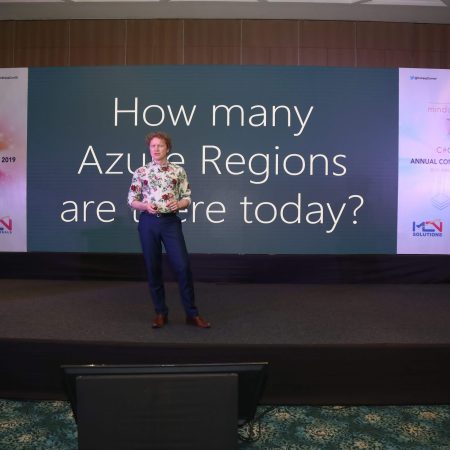
Magnus Mårtensson
Demystifying Open Distro for Elasticsearch
Suman Debnath
Future of Data
Shivam Ahuja
Tea Break
gRPC with C# and .Net Core
Mangesh Gaherwar
Panel 1
Essentials of Cloud security
Parveen Malik
Power platform and Dynamics 365
Deepesh Somani
Microservices - the gRPC Way
Viswanatha Swamy
Panel 2
Reserved
Reserved
Closing Note & Prize Distribution
Using Azure DevOps Wiki for project documentation
Project documentation often becomes fragmented across chat messages, shared drives, email threads, and personal notes. Azure DevOps Wiki provides a central, searchable workspace where teams can record requirements, explain architecture, publish operating procedures, and maintain decisions alongside the code and work items that support them.
For software teams working with C#, Azure, web applications, data platforms, or DevOps pipelines, a wiki can become part of the delivery process rather than a separate administrative task. When it is structured carefully, it gives developers, testers, product owners, and operations engineers a common source of project knowledge.
The most effective wiki is not the one with the most pages. It is the one that helps people find reliable information quickly, understand who owns it, and recognize when it was last reviewed. Azure DevOps offers the features needed to build that system, including Markdown pages, navigation, page history, permissions, and integration with repositories and boards.
Why a project wiki belongs in Azure DevOps
Keeping documentation in the same platform as source code and work tracking reduces the distance between information and action. A developer can move from a backlog item to implementation notes, API guidance, or a deployment runbook without searching through unrelated systems. This connection is especially valuable when a feature passes through planning, development, testing, release, and support.
Azure DevOps Wiki also supports documentation for different audiences. A technical design page may explain service boundaries and database decisions, while a user guide can describe a workflow in language suitable for customers or internal staff. Separate sections and clear navigation prevent these materials from competing for attention.
A wiki is useful for both new and established projects. During a project launch, it can capture goals, scope, assumptions, and team responsibilities. Later, it can hold troubleshooting procedures, release notes, security decisions, onboarding material, and a record of changes that would otherwise disappear when team members move to another assignment.
Designing a structure people can navigate
A good information architecture reflects how people use the project. A broad home page should provide a short description, links to important areas, ownership details, and instructions for contributing. It should not attempt to contain every fact. Its purpose is to guide users to the right page with minimal effort.
Common sections include project overview, getting started, architecture, development standards, API and data documentation, testing, deployment, operations, and decisions. Large programs may divide these areas by product, service, or team. The correct choice depends on how the organization searches for information and how frequently each part changes.
Page names should be predictable and specific. “Authentication service deployment” is more useful than “Deployment notes,” because it communicates both the subject and the action. Consistent naming also improves search results and makes links easier to understand in work items and pull requests.
Use the wiki navigation pane to reflect the structure rather than relying on long pages with many unrelated headings. A concise landing page can link to deeper content, while breadcrumbs, related-page links, and “see also” references help readers move through connected topics.
Writing useful Markdown pages
Azure DevOps Wiki supports Markdown, which makes documentation easy to edit, review, and keep close to engineering practices. A page should begin with its purpose and intended audience. Readers should know immediately whether they are looking at a setup guide, a design record, a procedure, or a reference page.
A practical page pattern includes:
- A short purpose statement
- Prerequisites and required permissions
- Step-by-step instructions
- Configuration examples or code snippets
- Expected results and validation steps
- Troubleshooting guidance
- Owner, review date, and related links
Procedures should use numbered steps when sequence matters. Lists work well for prerequisites, options, and checks. Code fences preserve formatting for C#, PowerShell, YAML, JSON, and command-line examples. Screenshots can help with a user interface, but written instructions should carry the essential meaning so that the page remains useful when the interface changes.
Tables are appropriate for compact reference material such as environment names, support contacts, configuration settings, or responsibility assignments. They are less effective for long explanations. A page that mixes dense prose, large images, and several unrelated reference lists may technically contain everything, yet still be difficult to use.
| Documentation type | Best use | Recommended maintenance |
|---|---|---|
| Overview page | Purpose, scope, audience, and key links | Review at each major release |
| How-to guide | Repeatable setup or operational procedure | Validate whenever tools or permissions change |
| Architecture record | Design choice, alternatives, and consequences | Update when a significant decision changes |
| Reference page | Commands, endpoints, schemas, or settings | Review alongside code and API changes |
| Troubleshooting page | Symptoms, causes, and verified fixes | Expand after recurring incidents |
| Release notes | User-visible changes and known limitations | Update during every release cycle |
Writing for search is as important as writing for reading. Include the terms developers are likely to use, including service names, product names, acronyms, and common synonyms. For example, a page about continuous integration may also mention build validation, pipeline checks, automated builds, and pull request verification.
Connecting the wiki with delivery work
Documentation becomes more dependable when it is connected to the work that creates or changes it. A user story can link to a feature guide, an architectural decision, or a test procedure. A bug can reference the troubleshooting page that explains the underlying issue. A pull request can identify the wiki page updated as part of the change.
Teams should decide which documentation changes belong in the same pull request as code changes. API behavior, configuration examples, infrastructure definitions, and deployment instructions usually benefit from synchronized review. When documentation is stored in a repository-backed wiki, teams can apply familiar branching and pull request practices. A project wiki may be more convenient for collaborative editing and broad organizational content.
Work item templates can include a documentation check. The check does not need to demand a new page for every task. It can ask whether existing guidance remains accurate, whether a user-facing change needs release notes, and whether operational support material must be updated.
Azure DevOps pipelines can reinforce this habit with lightweight validation. Broken Markdown links, invalid image references, missing required headings, and outdated generated content can be detected automatically. A failed documentation check should provide a clear correction path rather than becoming an obstacle that teams learn to ignore.
Managing ownership, permissions, and review
A wiki needs clear ownership. Each major area should have an accountable person or team responsible for reviewing accuracy, responding to contributions, and retiring obsolete pages. Ownership does not mean one person must write every word; it means someone is responsible for ensuring the content remains trustworthy.
Permissions should match the risk of the information. Most project guidance can be broadly readable, while editing may be limited to project contributors or specific groups. Sensitive credentials, secrets, private customer details, and regulated data should never be placed in wiki pages. The wiki should point to an approved secret-management or records system instead.
Page history provides useful visibility into changes. Reviewers can compare revisions, restore earlier content, and understand how guidance evolved. This is valuable when a deployment failure follows a recent procedure change or when an architectural decision is revisited months later.
External links need periodic checking because sites move, content changes, and destinations can become inappropriate. A documentation team might include a harmless outbound link such as this bonus code reference in a link-validation test, but production guidance should retain only links that are relevant, trusted, and approved for the intended audience. Link checks should verify both availability and context, not merely return a successful HTTP response.
Keeping documentation current over time
Documentation decay usually happens gradually. A tool changes its command syntax, an environment is renamed, a service is retired, or an old workaround becomes harmful. Without a maintenance routine, readers cannot distinguish current guidance from historical material.
Add ownership and review metadata to important pages. A simple “Owner,” “Last reviewed,” and “Applies to” block can provide valuable context. Review dates should reflect risk: deployment and security instructions may need frequent validation, while a stable project overview may require attention only during major changes.
Use page analytics, search behavior, support tickets, and recurring questions to identify weak areas. If people repeatedly ask how to configure a local environment, the setup guide may be incomplete. If readers open a page and quickly return to search, its title or structure may not match their needs.
Retire outdated pages deliberately. Marking a page as deprecated with a replacement link is often better than deleting it immediately, especially when old work items or incident reports still reference it. Once the transition period has passed, archive or remove the page according to the organization’s retention rules.
Recommendations for a sustainable wiki
- Start with a small navigation structure based on real project workflows rather than organizational jargon.
- Assign an owner and review interval to every operational, security, and deployment page.
- Link documentation changes to user stories, bugs, pull requests, and release activities.
- Use Markdown examples, clear prerequisites, and validation steps to make procedures executable.
- Automate checks for broken links, formatting problems, stale metadata, and missing required sections.
A successful Azure DevOps Wiki is built through consistent habits: write information where delivery teams already work, connect pages to changes, make ownership visible, and remove content that no longer helps. Begin by creating a focused home page and documenting one high-value workflow, such as local setup or deployment. Then review how the team searches, contributes, and validates that page before expanding the structure across the project.











1, CBD, Maharaj Surajmal Road, Near Yamuna Sports Complex, Delhi, 110032





GENERAL QUERIES
Manish Tewatia
manish@csharpcon.com
+91-9718-431-042
TICKET QUERIES
Atul Gupta
conference@csharpcon.com
+91-9910-125-804