

Presents


Magnus Mårtensson
Microsoft Regional Director, Azure MVP, CEO Loftysoft

Avirag Jain
Director & CTO R Systems

Mahesh Chand
Founder C# Corner, CEO Mindcracker

Chris Gali
CEO & Co-Founder Graphite

Subinder Khurana
Chief Architect StoryProcess, Founder NASSCOM DeepTech Club

Bryan Rishforth
Investor, Chairman Graphite

Bryn Everson
Director Biz Dev Graphite

Raj Tiwari
Digital Transformation Leader, Futurist and Visionary

Joseph Guadagno
Microsoft MVP, Lead Quicken Loans

Nikita Sachdev
Entrepreneur, Blockchain Enthusiast & Advisor, Social Media Influencer

Doug Wagner
COO & Founder Adapt Technical Group

Ritesh Modi
Architect, Senior Evangelist, Cloud Architect

Crystal Wenrick
Director Communications Mindcracker

Allen O’Neill
Microsoft MVP, Consulting Engineer/Architect
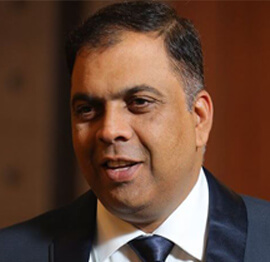
Praveen Kumar
CEO MCN Solutions

Chris Love
Founder Love2Dev, Microsoft MVP, Author

Sanjay Vyas
Microsoft Regional Director, Microsoft MVP, Founder & CEO SkillLabs Technologies

Veena Sarda
Deep Learning Consultant, Author

Sekhar Srinivasan
C# Corner MVP, Microsoft Certified Trainer, Pluralsight Author

Lalit Bansal
Founder & CEO - EIY SYS

Navdeep Garg
CEO Revinfotech

Prakash Tripathi
Tech Manager/Leader, Microsoft MVP, Blogger

Bhavna Jain
Breakthrough Consultant

Naveen Sharma
Enterprise Architect, Leadership Coach, Author

Vidya Vrat Agarwal
Principal Architect, Microsoft MVP, Author

Sheetal Agarwal
Founder Clownselors, Medical Clown, Trainer

Abhishek Kant
Founder GTM Catalyst

Vishnu Saran
Founder & CEO VoiceQube

Sandeep Soni
Founder & CEO Deccansoft, Microsoft Certified Trainer

Parveen Malik
AVP InfoSec & Vulnerability Management, Information Security Expert

Nitin Pandit
Microsoft MVP, Developer Evangelist, Author

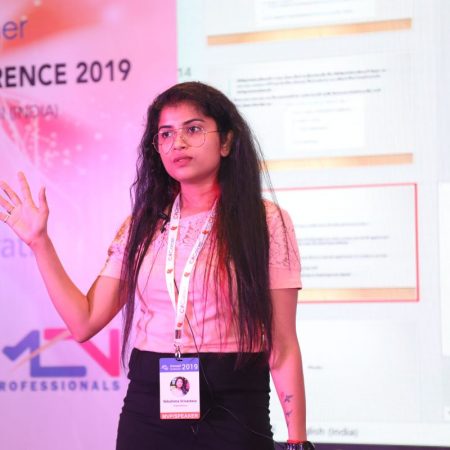
Niloshima Srivastava
C# Corner MVP, Tech Architect, Trainer, Blogger

Bala Chirtsabesan
Senior Software Engineer at Microsoft, Author

Manoj Mittal
Sr. Technical Architect, C# Corner MVP, Author

Chandni Di
Co-Founder Voice of Slum

Vithal Wadje
Technical Lead, Microsoft MVP, Author

Shivam Ahuja
Founder SkillCircle, Business Mentor

Chervine Bhiwoo
Solution Architect, Microsoft MVP, Author

Saurabh Jain
Vice President Paytm, Founder Fun2Do Labs, Author

Vinay Solanki
Head IoT at Lenovo, Founder IoT-NCR

Anshu kumari
Founder Blockchainkids, Inventor, Trainer

Amit Singal
CEO Startup Buddy

Dev Pratap
Co-Founder & CEO Voice of Slum

Amey Vartak
Technology Consultant, Full Stack Developer, C# Corner MVP, Author

Viswanatha Swamy
Principal Software Engineer, C# Corner MVP, Author

Sanket Verma
Research Engineer @ Ballistics (Forensics) and Chair, PyData Delhi

Sourabh Somani
Lead Developer, Microsoft MVP, Author

Abhishek Mishra
Software Architect, C# Corner MVP, Author

Siddharth Vaghasia
Technical Consultant, C# Corner MVP, Blogger

Bassam Alugili
Senior Software Specialist, Database Expert

S Ravi Kumar
Solution Architect, C# Corner MVP, Author

Sundaram Subramanian
Full Stack Developer, C# Corner MVP, Speaker

Deepesh Somani
Solution Architect, Microsoft MVP, Author

Debasis Saha
Technical Project Manager, C# Corner MVP, Blogger, Author

Vipul Jain
Software Architect, C# Corner MVP, Author

Akshay Patel
Technical Architect, Microsoft Certified Trainer, C# Corner MVP, Author

Stephen Simon
RPA Developer, Evangelist, Author

Vivek Sharma
Founder Kingster636, AR/VR Specialist

Jeetendra Gund
Technical Lead, C# Corner MVP, Author

Sujal Beniwal
AI Enthusiast, Student

M Viknaraj
Microsoft MVP, Azure Architect, Author

Prasham Sabadra
Software Architect, C# Corner MVP, Trainer, Author

Aakash Maurya
Senior Developer, C# Corner MVP, Speaker

Ankit Sharma
Senior Software Engineer, C# Corner MVP, Author

Mangesh Gaherwar
Team Lead, C# Corner MVP, Author

Viral Jain
Technical Consultant, C# Corner MVP, Author

Bhasker Das
Solution Architect, Evangelist

Manish Dwivedi
Associate Project Manager

Ck Nitin
Programmer, Author

Rohit Gupta
Technical Trainer, Author

Manish Tewatia
Full-stack Marketer, UX Designer

Bhavya Gaur
Technical Illustrator

Rohit Tomar
SEO/SMO Expert
Web Track
Cloud & Data Track
Dev Track
Registration & Breakfast
Future of Desktop Apps with JS (ElectronJs)
Nitin Pandit
Building Serverless Microservices Using Microsoft Azure
Vithal Wadje
Innovating RPA: A Robot for Every Person
Stephen Simon
Managing Cloud Storage Accounts using Logic Apps
Viknaraj Manogararajah
Data visualization using Python
Sekhar Srinivasan
Going Cross platform with AR Foundation
Vivek Sharma
Keynote
Managing your Azure dependencies in ASP.NET Core apps using VS
Bala Chirtsabesan
Securing Applications on Intelligent Azure
Abhishek Mishra
Getting started with Blazor the Framework of Future
S Ravi Kumar
Lunch
Build Progressive Web Apps using Angular 9
Debasis Saha
Build and deploy to any platform using Azure DevOps
Chervine Bhiwoo
Deep Dive in Azure Service Bus
Akshay Patel
Build a Native Mobile Application using React Native and JavaScript
Joseph Guadagno
Making sense of Web Job, Web Job SDK and Functions in Azure
Prakash Tripathi
CloudFront Distribution in AWS
Viral Jain
Tea Break
Introduction to PowerBI
Aakash Maurya
Build Advanced SPFx solutions with React and Graph API
Siddharth Vaghasia
Build Business Intelligence Analyst (BIA) Skills
Sundaram Subramanian
Deep dive of Power Platform – AI BUILDER
Prasham Sabadra
Panel 1
What's new in SharePoint development
Vipul Jain
Build a SSO (Single Sign On) based Native JavaScript application with Microsoft Identity within 10 minutes
Manoj Mittal
Panel 2
Applications and working of AI
Veena Sarda
Deploying serverless API's with .Net core 3.0 on AWS & Azure
Amey Vartak
Panel 3
Blockchain with .NET Core (Ark)
Anshu Kumari
Closing Note & Prize Distribution
Dev Track
Cloud Track
Architecture Track
Emerging Tech Track
Registration & Breakfast
Creating Full-Stack Web Apps Using Server-Side Blazor
Ankit Sharma
Real time face recognition with MS Cognitive Services
Niloshima Srivastava
Building Scalable APIs with GraphQL
Jeetendra Gund
Future of development with AI and Blockchain
Navdeep Garg
Debugging Tips and Tricks with Visual Studio 2019
Joseph Guadagno
Azure Containers
Abhishek Kant
Enterprise Architecture
Naveen Sharma
Bot Framework - learn it fast and look like a boss!
Allen O’Neill
Keynote
.Net Core & C# 8 Performance
David McCarter
Working with Azure kubernetes services
Ritesh Modi
Becoming an Architect
Vidyavrat Agarwal
Why Techies Need to Learn Product Management
Saurabh Jain
Lunch
Build a rules engine in .Net Core
Sanjay Vyas
Building CI and CD Pipeline using Azure DevOps
Sandeep Soni
Entity Framework Core - Tips and Tricks, Performance Optimization, and Tuning
Bassam Alugili
Hacking your way into Data Science
Sanket Verma
Speed up your .Net Core Website
Sourabh Somani
Azure
Magnus Mårtensson
Demystifying Open Distro for Elasticsearch
Suman Debnath
Future of Data
Shivam Ahuja
Tea Break
gRPC with C# and .Net Core
Mangesh Gaherwar
Panel 1
Essentials of Cloud security
Parveen Malik
Power platform and Dynamics 365
Deepesh Somani
Microservices - the gRPC Way
Viswanatha Swamy
Panel 2
Reserved
Reserved
Closing Note & Prize Distribution
Automating Cloud Deployments With Azure DevOps Pipelines
Cloud deployment automation gives software teams a dependable path from a committed change to a running application. Instead of relying on manual packaging, environment-specific instructions, and last-minute approvals, teams can define delivery steps as code and execute them consistently through Azure DevOps.
Azure DevOps Pipelines supports continuous integration and continuous delivery for applications hosted in Azure, on-premises infrastructure, or other cloud platforms. A pipeline can compile source code, run tests, build containers, provision resources, publish artifacts, and release an approved version to one or more environments.
The approach is especially valuable for teams working across C#, web development, data services, artificial intelligence, and cloud-native systems. Topics represented in the conference program often intersect around the same goal: making software delivery faster while keeping deployments secure, observable, and repeatable.
From Manual Releases To Repeatable Delivery
A manual release process usually depends on tribal knowledge. One engineer may know which command creates a production package, another may maintain a spreadsheet of server settings, and a third may perform a final configuration step from a local workstation. This arrangement can work for a small application, but it becomes fragile as the number of services, developers, and deployment targets grows.
An Azure DevOps pipeline replaces scattered instructions with an executable workflow. Every run starts from a known source revision and records the build number, test results, package contents, approvals, and deployment status. That audit trail makes it easier to identify what changed and to reproduce a successful release.
Automation also reduces variation between environments. Development, testing, staging, and production can follow the same deployment logic while receiving different configuration values through protected variables, variable groups, or Azure Key Vault references. The application package stays consistent; environment settings change in a controlled way.
The Building Blocks Of A Delivery Pipeline
A practical pipeline normally has several connected parts. The trigger defines when execution begins, such as a commit to a selected branch, a pull request update, a scheduled nightly build, or a release of another component. The build stage restores dependencies, compiles the application, runs automated tests, and creates a deployable artifact.
Artifacts are the handoff between build and release activities. For a .NET application, an artifact may contain published binaries and configuration templates. For a containerized service, it may be a Docker image pushed to Azure Container Registry. Keeping the artifact immutable prevents a package from being rebuilt differently for each environment.
Stages represent meaningful delivery boundaries. A pipeline might include Build, Test, Deploy to Development, Deploy to Staging, and Deploy to Production. Jobs within a stage run on agents, while tasks perform specific actions such as Azure CLI commands, infrastructure deployments, container pushes, or application publishing.
| Pipeline Element | Primary Purpose | Common Azure DevOps Implementation |
|---|---|---|
| Trigger | Starts validation or delivery | Branch, pull request, schedule, or pipeline completion |
| Build stage | Compiles code and creates a package | .NET SDK, Node.js, Maven, or container tasks |
| Artifact | Carries a tested version forward | Pipeline artifact, package feed, or container image |
| Environment | Represents a deployment target | Development, staging, production, or regional slot |
| Approval | Controls sensitive promotion | Manual approval or business-hours check |
| Variable group | Stores reusable configuration | Shared values with secret permissions |
| Deployment job | Applies the release | Azure Web App, Kubernetes, VM, or CLI task |
Designing A Reliable YAML Workflow
YAML pipelines make the delivery definition visible in source control. Teams can review changes to build steps just as they review application code. A basic workflow might select an Ubuntu-hosted agent, install a specific .NET SDK, restore packages, execute unit tests, publish the application, and upload the output as an artifact.
Versioning the pipeline alongside the application improves traceability. If a release fails after a pipeline modification, the team can compare revisions and roll back the workflow definition. Reusable templates can standardize security scans, test execution, naming conventions, and artifact publication across many repositories without duplicating every instruction.
A strong YAML design separates concerns. Build logic should create one trusted artifact, while deployment stages should consume that artifact. This prevents production from compiling a fresh version that was never tested in earlier environments. Conditions can then control promotion based on branch names, test outcomes, approvals, or deployment results.
For example, a pipeline may build on every pull request but reserve deployment stages for the main branch. A successful merge can automatically deploy to a development environment, pause for integration validation, and require an authorized approval before production. The workflow remains automated while governance is applied at the points where risk is highest.
Managing Environments And Infrastructure
Azure deployment automation becomes more dependable when application delivery and infrastructure provisioning are treated as related parts of the same system. Infrastructure as code tools such as Bicep, ARM templates, or Terraform can define resource groups, App Services, databases, networking, storage, and monitoring components. The pipeline can validate and apply those definitions before releasing the application.
Environment-specific values should be externalized rather than hardcoded in YAML or application repositories. Azure DevOps variable groups can provide shared settings, while Azure Key Vault is suited to secrets such as connection strings, certificates, and service credentials. Permissions should follow least-privilege principles, giving each service connection only the access required for its deployment scope.
Deployment strategies can also limit risk. App Service deployment slots allow a new version to run beside the current release before traffic is switched. Blue-green deployment maintains separate environments and moves users between them after validation. Canary delivery sends a small percentage of traffic to the new version, allowing teams to evaluate health signals before expanding exposure.
These techniques make rollback a deliberate operation instead of an emergency improvisation. A rollback may involve switching a slot, redeploying the previous immutable artifact, restoring a known infrastructure version, or reverting a feature flag. The correct approach depends on the application architecture and data model, but it should be tested before a real incident occurs.
Security, Quality, And Operational Feedback
A fast pipeline that delivers vulnerable or unstable software is not a successful pipeline. Quality gates should include unit tests, integration tests, static analysis, dependency checks, and container scanning where appropriate. Results need to be visible in the Azure DevOps run so that failed validation blocks promotion rather than becoming an informal warning.
Credentials require special care. Service connections should use managed identities or workload identity federation when available, reducing the need for long-lived secrets. Secret values must never be printed in logs, embedded in repository files, or passed through unprotected command-line arguments. Branch policies can require code review and successful checks before a change reaches the deployment branch.
Operational feedback completes the delivery loop. Azure Monitor, Application Insights, Log Analytics, and platform health metrics can show whether a deployment improves or damages application behavior. Pipeline stages can include smoke tests that verify endpoints, authentication flows, queue processing, or critical database operations immediately after release.
Controls That Keep Releases Predictable
Teams can improve deployment reliability by establishing a small set of consistent controls across repositories:
- Use pull request validation to compile code and run automated tests before merging.
- Produce one immutable artifact and promote it through every environment.
- Protect production variables, service connections, and approval rules with role-based access.
- Add post-deployment smoke tests and connect failures to alerts or incident workflows.
- Keep rollback instructions and recovery procedures versioned with the application.
These practices work best when they are automated wherever possible. A policy that depends on someone remembering a checklist will eventually be skipped under pressure. A branch rule, security scan, approval check, or deployment gate enforced by the platform provides a more dependable boundary.
Teams should also measure the delivery process itself. Lead time from commit to production, deployment frequency, failed deployment rate, and mean time to recovery reveal whether automation is creating genuine improvement. A pipeline that runs quickly but frequently causes outages needs better validation; a safe pipeline that takes hours to execute may need parallel jobs, caching, or more focused test stages.
Scaling Delivery Across Teams And Services
As organizations adopt microservices, shared APIs, data platforms, and front-end applications, pipeline design must support independent ownership without creating inconsistent standards. A central engineering team can publish approved YAML templates for authentication, dependency scanning, artifact naming, and Azure resource deployment. Product teams then provide service-specific inputs while inheriting common safeguards.
Multi-stage pipelines are useful when release coordination matters. A service can deploy independently to development, while a coordinated production stage promotes compatible versions of several services. Pipeline resources and completion triggers can connect related workflows, but dependencies should remain explicit so that a failed upstream release cannot silently produce an incomplete system.
Self-hosted agents may be appropriate for private networks, specialized tooling, or workloads that cannot use Microsoft-hosted infrastructure. They require patching, capacity planning, access control, and cleanup procedures. Hosted agents reduce operational overhead, but either model should use disposable workspaces and avoid storing secrets or build outputs on the machine after execution.
Turn Deployment Knowledge Into Delivery Practice
Azure DevOps Pipelines provides the mechanics for cloud delivery, but the best results come from thoughtful engineering decisions: define stages around real risks, keep artifacts immutable, protect credentials, test infrastructure changes, and make operational health part of the release signal. Automation should remove uncertainty, not hide it.
Start with one service and map its current path from commit to production. Convert each manual step into a visible pipeline task, remove steps that add no value, and add checks where failures would be costly. Then expand reusable templates and environment controls as the organization gains confidence. Explore the conference resources, apply these practices to a working Azure project, and make the next deployment a repeatable engineering process rather than a one-time event.










1, CBD, Maharaj Surajmal Road, Near Yamuna Sports Complex, Delhi, 110032





GENERAL QUERIES
Manish Tewatia
manish@csharpcon.com
+91-9718-431-042
TICKET QUERIES
Atul Gupta
conference@csharpcon.com
+91-9910-125-804